CCTV: everything you need to know about security for yourbusiness
The most common mistake foreign companies make when opening operations in Mexico is assuming that a standard industrial building —walls, roof, and concrete flooring— is already ready to run cutting-edge technology. It isn’t. A Class A industrial building solves the space; it doesn’t solve the connectivity, power, or control that advanced manufacturing requires. That gap, when it isn’t planned for at the design stage, gets paid for later in delays, rework, and systems that never perform the way they should.

For many mid-sized companies, a CCTV system is still synonymous with "putting up a few cameras." But as a plant, warehouse, or corporate office grows —or as its operations become remote or multi-site— CCTV stops being passive surveillance and becomes a control tool: it lets you open and close access points, trigger alarms, and oversee operations from anywhere, without needing to be physically on site. This guide explains what a CCTV system is, how it works, what you need for a proper installation, and how to choose the right one for your site.
What is a CCTV system and how does it work?
CCTV stands for closed-circuit television: a set of cameras that capture video and transmit it to a central recording and viewing point, rather than broadcasting it openly. In today’s systems, that transmission no longer depends on isolated coaxial cabling: cameras are network (IP) devices that run over the same structured cabling infrastructure as data and voice, and draw power through the network cable itself (PoE), with no need for a separate electrical outlet at each camera.
Video is stored on a network video recorder (NVR) or in the cloud, and can be reviewed from an on-site monitor or a mobile app. More advanced systems add analytics: motion detection, people counting, or automatic alerts, so the system doesn’t just record —it reports. When a site has several cameras —or several sites—, everything is managed from video management software (VMS): a single platform where footage from any camera can be viewed, searched, and exported, without having to log into each device separately.
From traditional CCTV to intelligent systems
For years, a CCTV system was essentially a logbook: it recorded, and someone had to review hours of footage to find anything. That changed with AI-based video analytics. Today’s systems can distinguish between a person, a vehicle, and an animal; alert you when someone crosses a virtual line after hours; count how many people enter an area; or flag when a zone that should be staffed is left unattended. The practical difference is that the system no longer depends on someone watching the screens in real time: it notifies you when something relevant happens, instead of you having to go looking for it later.
Camera types and their applications
Fixed cameras: coverage of a specific angle. Ideal for entrances, loading docks, and passageways.
PTZ (pan-tilt-zoom) cameras: enable active tracking. Used in yards, parking lots, and large open areas.
Dome cameras: discreet, with wide coverage. Common in interiors, hallways, and common areas.
Thermal cameras: detect in low-visibility conditions. Used on perimeters and to monitor processes where temperature is a critical variable.
AI-analytics cameras: people counting, intrusion detection, or license plate reading, for operations that need data, not just footage.
What you need for a complete installation
Cameras suited to the site: type, resolution, and weatherproofing (IP66/IP67) for outdoor locations.
Structured network cabling with PoE power, which avoids running additional electrical wiring to each camera.
A network video recorder (NVR) with storage capacity sized to the number of cameras and the retention period you need.
Monitors or an on-site monitoring point for real-time supervision.
Sufficient connectivity and bandwidth for uninterrupted streaming and remote access.
Backup power (UPS) so the system keeps recording during a power outage.
The real benefits for your operation
For an operations director or plant manager, the benefit isn’t "having cameras": it’s having remote control of the operation. That’s the case, for example, with industrial plants in Monterrey that, reporting to headquarters or clients in the United States, need someone able to oversee the site, authorize access, trigger lockdowns, and check alarms without being physically there —all from an app on their phone.
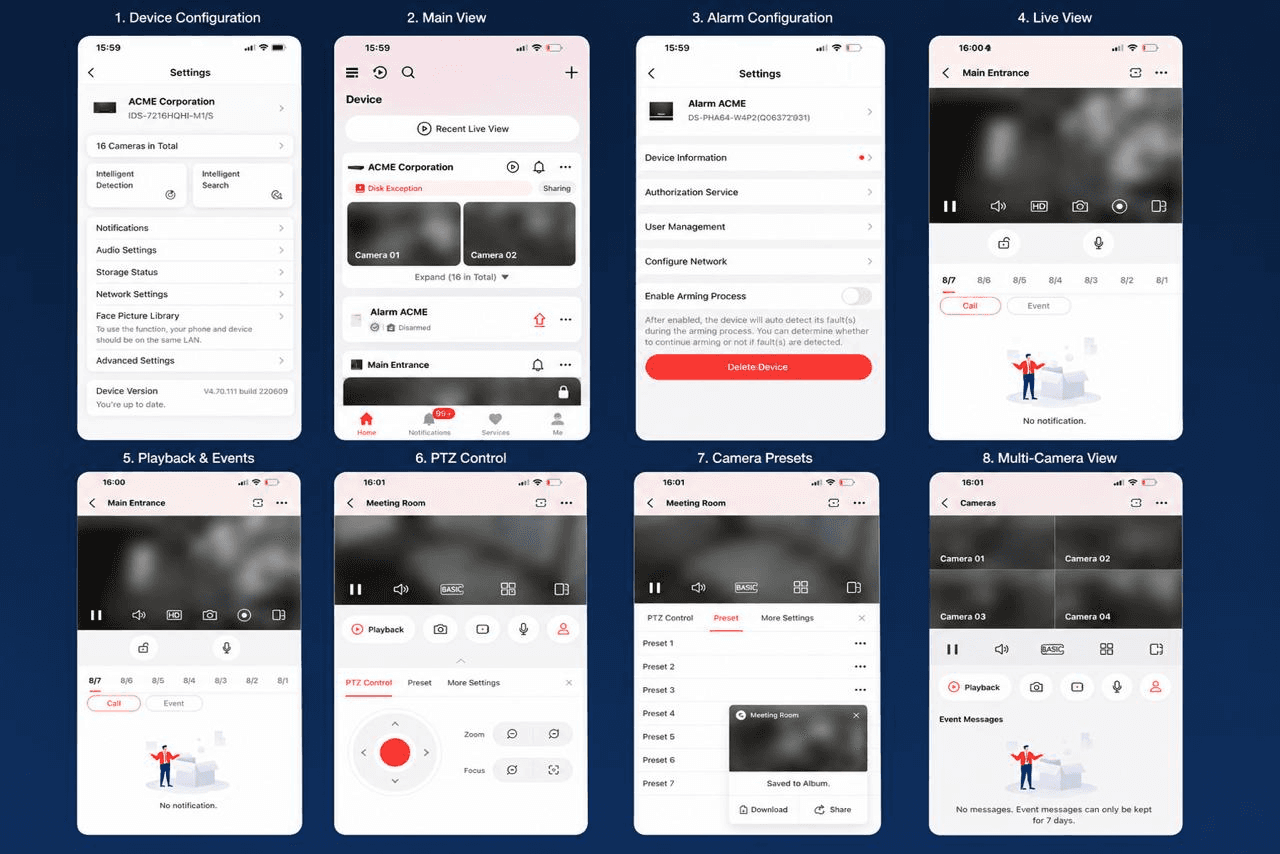
Remote oversight of one or several sites from anywhere.
Access control, lockdowns, and lockouts managed from an app, without relying on on-site staff.
Faster response to incidents, with real-time alerts.
Evidence available for security processes, audits, or insurance requirements.
Fewer physical patrols and less dependence on someone "being there" to know what’s happening.
It’s also the kind of project InfraCore recently carried out for Q-Logistics | Polymat Tricon Energy in Monterrey: installing an eight-camera CCTV system, with work performed at heights of up to seven meters, integrated into the site’s structured cabling and a communications room built from scratch to centralize the data and video network, plus Wi-Fi connectivity for the entire operation. The CCTV system wasn’t installed in isolation —it was built as part of the same connectivity infrastructure that supports the rest of the site.
You can see the full project on LinkedIn.
How to choose the right system for your site
There’s no one-size-fits-all CCTV system. Before choosing, it’s worth considering:
The type of facility: an industrial building doesn’t have the same requirements as a corporate office or a distribution center.
Lighting conditions and weather exposure at each point that needs coverage.
The number of access points and critical spots that actually need coverage.
Whether the system needs to integrate with existing access control and alarms.
Regulatory or insurance requirements, where they apply.
Whether you need analytics and video intelligence, or basic recording and playback is enough.
The cost of maintenance over time, not just the upfront installation cost.
Maintenance and system lifecycle
A CCTV system isn’t finished on installation day —it has to be sustained over time. Cameras need firmware updates to fix security vulnerabilities, storage needs to be checked so it doesn’t fill up or overwrite footage too soon, and hardware has a lifecycle after which it should be replaced before it fails, not after. A system without maintenance tends to degrade silently: out-of-focus cameras, incomplete recordings, or sensors that stop responding —and no one notices until there’s footage that needs reviewing and isn’t there.
How InfraCore supports you
InfraCore doesn’t just install cameras: it designs the full infrastructure a CCTV system needs to run reliably —cabling, conduit routing, technical rooms, and backup power— and integrates it with access control and alarms on the same network, using PoE. We work with equipment from globally recognized manufacturers, such as Hikvision, giving access to a wide camera catalog and long-term support and updates. All under a single preventive and corrective maintenance contract, so you don’t have to coordinate separately with a camera installer, a cabling contractor, and a support provider.
Learn more about the service at InfraCore.
Ready to take the next step?
Want to know what your site needs to achieve real remote control?
Book your Discovery Session with DITESA →
¿LISTO PARA DEJAR DE APAGAR FUEGOS?
Agenda una Discovery Session gratuita
Analizamos tu infraestructura actual, identificamos riesgos y te presentamos una propuesta concreta. Sin tecnicismos. Sin compromiso.
Agenda tu Discovery Session →
Ideas and Knowledge
Explore articles with ideas, trends, and practical learnings about technology, innovation, and digital growth.